

Master troubleshooting tech issues: 7 proven methods

You’re staring at a frozen screen, a cryptic error message, or a device that simply refuses to cooperate. Tech problems strike at the worst moments, leaving you frustrated and unsure where to start. Whether you’re a student racing against a deadline, a professional managing critical systems, or someone who just wants their devices to work reliably, effective troubleshooting skills transform chaos into control. This guide walks you through proven, systematic methods that professionals use to diagnose and resolve tech issues efficiently, helping you move from reactive panic to confident problem solving.
Table of Contents
- Key takeaways
- Understanding the 7 step troubleshooting methodology
- Advanced troubleshooting techniques for challenging scenarios
- Handling edge cases and using automation in troubleshooting
- Combining reactive and proactive approaches for effective problem solving
- Enhance your tech skills with our learning resources
- What are the first steps to start troubleshooting a tech issue?
Key Takeaways
| Point | Details |
|---|---|
| Seven step method | Follow a structured seven step troubleshooting process to diagnose problems systematically rather than guessing. |
| OSI model and root cause | Integrate OSI layered thinking and root cause analysis such as Five Whys to identify underlying causes rather than symptoms. |
| Automation for edge cases | Automate repetitive checks and document edge cases so resolutions are faster and more consistent. |
| Documentation and knowledge base | Document findings and outcomes to build a searchable knowledge base that speeds future resolutions. |
Understanding the 7 step troubleshooting methodology
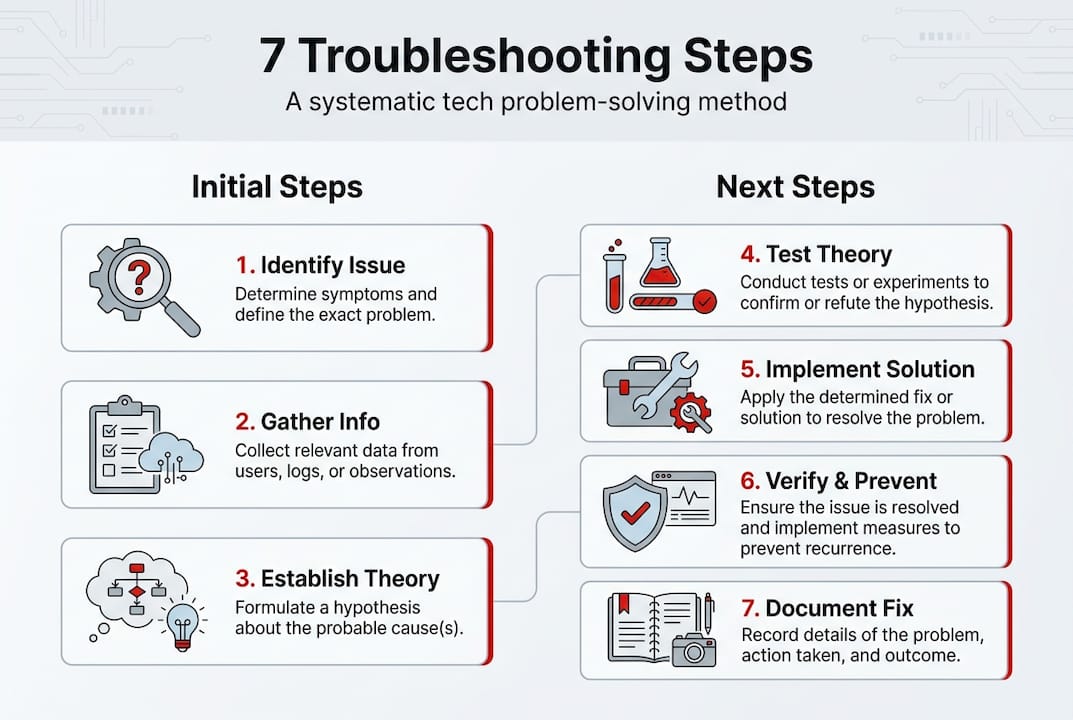
Effective troubleshooting starts with structure, not guesswork. CompTIA’s standard troubleshooting methodology consists of 7 steps that form the backbone of professional IT support. This framework works for everything from a laptop that won’t boot to network connectivity failures, giving you a reliable path forward regardless of the specific technology involved.
Here’s how the seven steps break down in practical terms:
- Identify the problem by gathering information from users, checking error messages, and observing symptoms without jumping to conclusions.
- Establish a theory of probable cause by considering obvious possibilities first, then working toward more complex explanations.
- Test the theory to determine the actual cause, questioning your assumptions if initial tests fail.
- Establish a plan of action to resolve the problem, documenting each step you intend to take.
- Implement the solution or escalate to specialists if the issue exceeds your expertise or authority.
- Verify full system functionality and implement preventive measures to avoid recurrence.
- Document findings, actions, and outcomes to build institutional knowledge and speed future resolutions.
The real power of this methodology lies in its systematic nature. When you identify a problem, resist the urge to immediately start changing settings or reinstalling software. Instead, gather concrete details. What exactly happened? When did it start? What changed recently? Has this occurred before? These questions reveal patterns that point toward root causes rather than symptoms.
Testing theories requires discipline. If your first hypothesis proves wrong, document why and move to the next possibility. Many tech problems persist because people keep trying variations of the same failed solution instead of systematically eliminating possibilities. When implementing fixes, change one variable at a time so you know exactly what resolved the issue.
Pro Tip: Before diving into technical diagnostics, question your assumptions about what the problem actually is. Users often describe symptoms in ways that point toward incorrect causes, so verify the actual behavior yourself before forming theories.
Documentation feels tedious in the moment but pays massive dividends over time. Recording what you tried, what failed, and what ultimately worked creates a searchable knowledge base. When similar issues arise later, you’ll resolve them in minutes instead of hours. This practice becomes especially valuable when managing work network monitoring across multiple systems where patterns emerge across different incidents.
The methodology also builds troubleshooting confidence. Each resolved issue strengthens your diagnostic instincts and expands your mental catalog of common problems and solutions. You’ll start recognizing patterns faster and developing better initial theories based on accumulated experience.
Advanced troubleshooting techniques for challenging scenarios
Some tech problems resist standard approaches, requiring more sophisticated diagnostic strategies. Expert techniques include OSI model approaches, Five Whys root cause analysis, divide and conquer, environment isolation, and thorough documentation that help you tackle issues where the cause isn’t immediately obvious or where multiple factors interact in complex ways.

The OSI model approach applies layered thinking to network and system issues. Bottom up troubleshooting starts with physical connections and hardware, then moves through network protocols, applications, and user interfaces. This works well when you suspect infrastructure problems. Top down troubleshooting begins with user facing symptoms and works backward toward underlying causes, ideal when applications behave unexpectedly but infrastructure seems stable. Choosing the right direction saves time by focusing effort where problems most likely exist.
Five Whys root cause analysis digs beneath surface symptoms by repeatedly asking why a problem occurs. If a server crashes, why? Because memory filled up. Why did memory fill? Because a process leaked memory. Why did the process leak memory? Because recent code changes didn’t properly release resources. Why weren’t those changes caught? Because testing didn’t include memory profiling. This technique reveals systemic issues rather than just fixing immediate symptoms.
Divide and conquer breaks complex systems into smaller components for isolated testing. When a web application fails, test the database connection separately from application logic, then test API endpoints individually. This isolation identifies exactly which component causes the failure, eliminating guesswork and reducing the scope of investigation dramatically.
Environment isolation determines whether problems stem from specific configurations or affect all environments. Reproduce issues in test environments before making production changes. Compare working systems against failing ones to identify configuration differences. This approach protects production systems while giving you freedom to experiment with potential solutions.
Pro Tip: Maintain a troubleshooting journal that captures not just solutions but your diagnostic reasoning process. Reviewing how you approached past problems reveals thinking patterns that either accelerate or hinder resolution, helping you refine your methodology over time.
These advanced techniques integrate naturally with emerging technologies. AI tools in troubleshooting can analyze logs faster than humans, identifying patterns across thousands of events that would take hours to review manually. Machine learning models predict likely causes based on symptom combinations, suggesting diagnostic paths you might not consider independently.
Combining traditional systematic approaches with modern analytical tools creates a powerful troubleshooting capability. You bring human intuition, contextual knowledge, and creative problem solving while AI contributes pattern recognition, rapid data analysis, and statistical correlation. This partnership mirrors how AI content editing methods enhance rather than replace human judgment, with technology handling repetitive analysis while you focus on strategic decision making.
The key to mastering advanced techniques is practicing them on real problems rather than just understanding them conceptually. Each method strengthens different diagnostic muscles, and knowing when to apply which approach comes from accumulated experience across diverse scenarios.
Handling edge cases and using automation in troubleshooting
Edge cases represent the troubleshooting scenarios that keep experienced technicians humble. Edge cases involve boundary conditions and nondeterministic bugs requiring techniques like fuzz testing and boundary value analysis that go beyond standard diagnostic procedures. These problems occur unpredictably, often under specific combinations of conditions that testing didn’t anticipate.
Common edge case characteristics include intermittent failures that disappear when you try to reproduce them, problems that only affect certain user configurations, issues triggered by race conditions or timing dependencies, and bugs that emerge only under extreme load or unusual input combinations. Standard troubleshooting often fails because these problems don’t follow predictable patterns.
Effective edge case troubleshooting requires specialized approaches:
- Boundary value analysis tests behavior at input limits, where systems often fail in unexpected ways
- Fuzz testing throws random or malformed data at systems to expose hidden vulnerabilities
- State machine analysis maps all possible system states to identify unreachable or invalid conditions
- Concurrency testing deliberately creates race conditions to expose timing dependent bugs
- Environmental variation testing systematically changes configuration parameters to identify sensitive dependencies
| Technique | Best Used For | Key Advantage |
|---|---|---|
| Boundary value analysis | Input validation failures | Finds limits where logic breaks |
| Fuzz testing | Security vulnerabilities | Discovers unexpected input handling |
| State machine analysis | Complex workflow bugs | Maps impossible state transitions |
| Concurrency testing | Multi threaded applications | Exposes race conditions |
| Environmental variation | Configuration dependent issues | Identifies specific trigger conditions |
Automation transforms edge case troubleshooting from frustrating guesswork into systematic discovery. Automated testing frameworks can execute thousands of test variations overnight, exploring input combinations no human would manually attempt. Continuous monitoring systems detect anomalies in real time, capturing diagnostic data the moment edge cases occur rather than trying to reconstruct conditions after the fact.
AI powered diagnostics excel at edge case detection because machine learning models identify subtle patterns in system behavior that signal impending failures. These tools analyze metrics across normal operations to establish baselines, then flag deviations that might indicate emerging problems. Predictive maintenance catches edge cases before they impact users, shifting troubleshooting from reactive to proactive.
Integrating automation into your troubleshooting workflow requires thoughtful implementation. Start with automated log aggregation and analysis so you’re not manually searching through gigabytes of data. Implement synthetic monitoring that continuously tests critical functions, immediately alerting you when behavior changes. Use automated testing suites to reproduce suspected edge cases systematically rather than relying on manual recreation attempts.
The relationship between automation and human expertise mirrors effective monitoring your work network strategies where automated systems handle continuous surveillance while human judgment interprets alerts and determines appropriate responses. Automation extends your diagnostic reach but doesn’t replace the contextual understanding and creative problem solving that experienced troubleshooters bring to complex issues.
Edge cases also highlight the critical importance of comprehensive logging and observability. When problems occur rarely or unpredictably, you need detailed diagnostic data captured automatically. Implement structured logging that records not just errors but the full context surrounding them. Use distributed tracing in complex systems so you can follow requests across multiple services and identify exactly where edge cases trigger failures.
Combining reactive and proactive approaches for effective problem solving
The most effective troubleshooting strategies balance immediate problem resolution with long term prevention. Combining reactive incident management and proactive problem management reduces recurrence and Mean Time To Repair by addressing both symptoms and underlying causes. This dual approach transforms troubleshooting from constant firefighting into sustainable system improvement.
Reactive troubleshooting focuses on restoring service quickly when issues occur. You diagnose the immediate problem, implement a fix, and verify that users can resume normal operations. This approach prioritizes speed and availability, accepting temporary workarounds if they restore functionality faster than permanent solutions. Reactive methods excel during outages or critical failures where every minute of downtime carries significant cost.
Proactive troubleshooting investigates root causes to prevent future occurrences. After restoring service reactively, you analyze why the problem happened, identify contributing factors, and implement systemic improvements. This approach prioritizes reliability and quality, investing time in comprehensive solutions that eliminate entire categories of problems rather than just fixing individual incidents.
| Aspect | Incident Management (Reactive) | Problem Management (Proactive) |
|---|---|---|
| Primary goal | Restore service quickly | Prevent recurrence |
| Time horizon | Immediate | Long term |
| Success metric | Mean Time To Repair | Reduction in incident frequency |
| Typical actions | Workarounds, quick fixes | Root cause analysis, systemic improvements |
| Resource focus | On call response teams | Analysis and engineering teams |
Integrating both approaches creates a powerful troubleshooting capability. When an incident occurs, your immediate response focuses on restoration using whatever methods work fastest. Document the temporary fix and schedule follow up investigation. Once service is restored and pressure decreases, conduct thorough root cause analysis to understand why the incident happened and what systemic changes would prevent similar issues.
This integration delivers multiple benefits. Users experience shorter outages because you’re not trying to implement perfect solutions during crises. System reliability improves over time because you’re systematically eliminating root causes. Your team experiences less stress because recurring problems gradually disappear, reducing the constant interruption of emergency responses. Knowledge accumulates as each incident investigation adds to your understanding of system behavior and failure modes.
Pro Tip: Create a formal handoff process between reactive and proactive phases where incident responders document not just what they fixed but what questions remain unanswered. This ensures proactive investigations focus on the most valuable improvements rather than just analyzing whatever seems interesting.
Balancing reactive and proactive effort requires conscious resource allocation. Organizations often get trapped in purely reactive modes where constant firefighting consumes all available time, preventing the proactive work that would reduce future incidents. Break this cycle by explicitly reserving capacity for proactive problem management, treating it as essential rather than optional work that only happens when time permits.
The balance also depends on system maturity and risk tolerance. New systems or rapidly changing environments may require more reactive focus as you discover unexpected behaviors and edge cases. Mature, stable systems benefit from heavier proactive investment that drives continuous reliability improvement. High risk environments like healthcare or financial systems demand proactive approaches that prevent problems before they impact critical operations.
Effective troubleshooting also considers the broader context of tech security insights where many incidents trace back to security vulnerabilities or configuration weaknesses. Proactive problem management naturally incorporates security hardening, access controls, and defense in depth strategies that prevent both functional failures and security incidents.
The ultimate goal is building systems that troubleshoot themselves through comprehensive monitoring, automated remediation, and self healing architectures. While human expertise remains essential for complex problems and strategic decisions, automation handles routine issues and provides diagnostic insights that accelerate human troubleshooting when intervention becomes necessary.
Enhance your tech skills with our learning resources
Mastering troubleshooting requires continuous learning and skill development beyond what any single article can provide. TechMoths offers comprehensive resources designed to accelerate your growth as a tech professional, whether you’re building foundational skills or advancing toward expert level capabilities.
Our personalized learning tactics help you identify knowledge gaps and create targeted improvement plans that match your specific learning style and career goals. Rather than following generic curricula, you’ll develop skills that directly address the types of problems you encounter most frequently, making learning immediately applicable to real world challenges.
For professionals looking to advance their careers, our career development steps guide provides strategic frameworks for building expertise that employers value. Technical troubleshooting skills combine with communication, documentation, and analytical thinking to create comprehensive professional capabilities that open doors to senior roles and specialized positions.
Explore how AI in education engagement enhances learning outcomes through adaptive content, intelligent feedback, and personalized pacing that accelerates skill development. These same AI principles that improve educational effectiveness also power the diagnostic tools and automated systems that modern troubleshooting increasingly relies upon, making AI literacy essential for tech professionals.
What are the first steps to start troubleshooting a tech issue?
Begin by clearly defining the problem through direct observation rather than relying solely on user descriptions. Gather specific details about what’s failing, when it started, what changed recently, and whether the issue is consistent or intermittent. Question your initial assumptions and verify the actual behavior before forming theories about causes. This disciplined information gathering prevents wasted effort chasing incorrect diagnoses.
How can automation help in solving complex tech problems?
Automation accelerates pattern detection across large data sets that would take humans hours or days to analyze manually. AI content editing tools demonstrate how machine learning identifies subtle patterns and anomalies that human review might miss. In troubleshooting, automated monitoring continuously watches system behavior, immediately alerting you to deviations while capturing diagnostic data the moment problems occur. AI powered diagnostics also predict potential failures before they impact users, shifting troubleshooting from reactive to proactive.
What’s the difference between incident and problem management?
Incident management focuses on restoring service as quickly as possible when failures occur, prioritizing availability over perfect solutions. Problem management investigates root causes after service restoration to prevent future occurrences through systemic improvements. Incident management asks how to fix this now, while problem management asks why this happened and how to prevent it. Both approaches are essential, with incident management handling immediate crises and problem management driving long term reliability improvements.
How important is documentation in troubleshooting?
Documentation transforms individual problem solving into organizational knowledge that accelerates future resolutions. Recording what you tried, what failed, and what ultimately worked creates searchable references that help you and others resolve similar issues in minutes instead of hours. Documentation also reveals patterns across multiple incidents that might not be obvious when examining problems individually. When combined with effective work network monitoring guides, comprehensive documentation enables proactive problem management that prevents recurring issues rather than just fixing them repeatedly.
